Unlocking Opportunities with Googlebook: A New Era for Android Apps
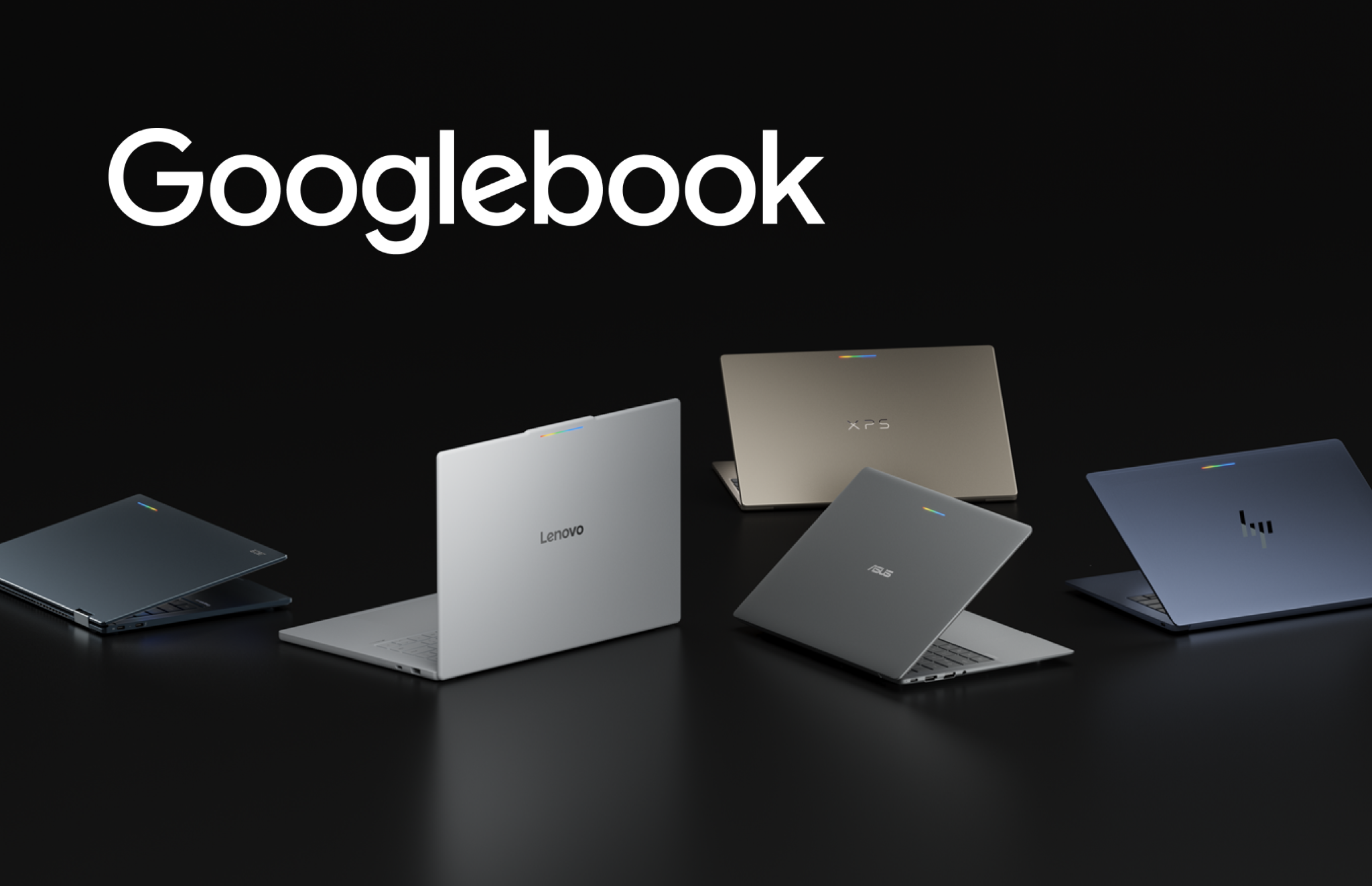
Introducing Googlebook: A Game Changer for Android Applications
Googlebook has emerged as an innovative category of laptops that harnesses the power of a shared Android foundation. This new platform combines high-performance hardware from renowned manufacturers like HP, Dell, Lenovo, Acer, and Asus, delivering both mobile convenience and desktop capabilities. Users can expect high-resolution OLED touchscreens, dedicated keyboards, and precision trackpads, all designed to provide an all-day battery experience. With the integration of OS-level Gemini Intelligence, transitioning from quick phone interactions to immersive laptop sessions has never been smoother.
Seamless App Integration and Enhanced Visibility
For developers looking to expand their reach, bringing applications to Googlebook presents significant opportunities within the Android ecosystem. Google Play is set to promote optimized apps through dedicated badging, improved search visibility, and featured placements on curated store homepages. This initiative also prepares developers for the Apps Experience Program, which offers a new program rate card aimed at driving business growth.
Upon setting up a new Googlebook device using an Android phone, users will see optimized apps prominently displayed for easy transfer, ensuring that your app gains immediate visibility on their new device.
Adaptive Development: No Need for a Complete Overhaul
The beauty of Googlebook lies in its adaptive development approach. Developers need not create separate applications from scratch to leverage this platform. If your app already incorporates adaptive layouts, it is well-positioned for Googlebooks. By building on existing adaptive UI foundations, window size classes, and multi-input support, you can deliver a tailored user experience that meets the expectations of desktop environments.
Designing for Desktop: Shifting User Expectations
On a laptop, user expectations shift, demanding higher information density, precision input, and the ability to multitask effectively. To meet these needs, developers should follow desktop design principles rather than merely stretching mobile interfaces across larger screens. An adaptive layout should reorganize content into functional groupings, enhancing usability.
- Adopt a multi-pane architecture to allow your UI to expand and reveal richer details based on window boundaries.
- Utilize Navigation 3 to implement adaptive scene strategies that coordinate multi-pane layouts directly from your back stack.
- Incorporate scene decorators to maintain persistent desktop navigation rails.
- Experiment with layout primitives like Grid and FlexBox to organize complex content dynamically.
Enhancing User Experience with Advanced Features
Once your core layout is adaptive, consider enriching your app with features that fully utilize a desktop environment. Productivity on Googlebook hinges on versatile input methods, and Jetpack Compose supports physical keyboard navigation and pointer selection natively. Consider adding contextual cursors for visual feedback on text entry and tool selection, along with right-click context menus and hover states for enhanced usability.
Moreover, Googlebook allows for free-form windowing, enabling users to resize app windows dynamically. Implementing multi-instance support allows users to launch independent windows for comparing documents or managing multiple tasks simultaneously. This capability can be complemented by drag-and-drop functionality, facilitating smooth interactions between windows.
Connecting Across Devices with Continue On
Googlebook also features the Continue On functionality, which maintains connections across phones, tablets, and Googlebooks. This bidirectional handoff allows users to start tasks on one device and seamlessly transition to another, preserving context such as document positions and active tabs.
Streamlining Development with AI Assistance
Testing and optimizing apps for Googlebook can integrate smoothly into existing development workflows. Developers can leverage AI-assisted development tools to modernize layouts more efficiently. The adaptive skill within AI agents provides the necessary context to refactor mobile layouts into responsive Compose containers automatically, streamlining the implementation process.
As Googlebook represents a significant advancement for the Android ecosystem, it offers developers a premium platform to create richer, more capable experiences. By adopting adaptive development practices, a single codebase can ensure optimal performance across phones, foldables, tablets, and Googlebooks, while enhancing visibility on Google Play. For more information, developers can explore the documentation available at the Googlebook developer hub and start building for this exciting new platform today!
Source for the original facts: Original source.