Enhancements in Android Developer Tools Unveiled at Dev Summit
The Android Dev Summit this year highlighted significant advancements in developer tools aimed at boosting productivity for Android app developers. Whether you prefer using Android Studio or the command line with Android CLI, the updates are designed to streamline the app development process and enhance collaboration with AI agents.
New Features in Android Studio
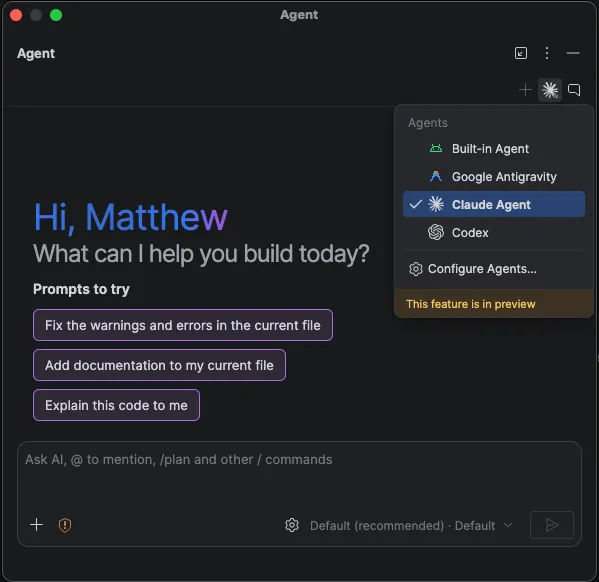
Android Studio has long been a favored environment for professional Android developers, and recent updates further solidify its status. The introduction of the Bring Your Own Agent (BYOA) feature now allows developers to integrate over 40 compatible coding agents directly within the IDE. This flexibility means developers can choose the agents that best fit their project requirements, including popular AI tools already in use.
To access these agents, simply navigate to Settings > Tools > AI > Agents within Android Studio. Here, you can browse, install, and switch between multiple agents as needed. This update ensures that developers have immediate access to new agent features, all while benefiting from Android Studio’s robust project management capabilities, including symbol resolution and the Emulator.
Enhanced Code Review Process
Understanding changes made by AI agents can be challenging, especially with large code modifications. To address this, Android Studio now includes an agentic code review experience. Developers can initiate a review session from the pending changes window, allowing Android Studio to generate a report highlighting potential issues. Additionally, the new /review command can provide AI-guided walkthroughs to clarify more extensive changes, helping developers grasp what adjustments have been made and allowing agents to rectify any identified issues.
Introducing Android Bench 2.0
With numerous models and agents available, selecting the right one for a project can be daunting. To assist developers, Android Bench 2.0 has been introduced. This leaderboard evaluates the performance of various large language models (LLMs) on real-world Android development tasks, such as UI migration or app creation from mockups. Each model’s effectiveness is assessed based on actual performance, not just compilation success, providing developers with valuable insights into which model to employ for their specific needs.
XR Emulators and Custom Testing Environments
The latest updates also include stable emulators for XR glasses, audio glasses, and display glasses. Developers can create these emulators directly from Android Studio, enabling them to customize testing environments with 360-degree photos or feeds from connected cameras. This feature allows for testing in real-world locations from virtually anywhere, enhancing the development of XR experiences.
Moreover, the updated Emulator introduces new hardware indicators for microphone and camera status, along with improvements to the Pairing Wizard, making it easier and faster to connect virtual devices.
Streamlined UI Migration and Android CLI Enhancements
Migrating UI from XML Views to Jetpack Compose can be a labor-intensive process. However, Android Studio now offers a Migration Assistant that automates much of this task. By right-clicking on any XML layout and selecting AI > Migrate to Compose, developers can initiate the conversion process efficiently, saving time and effort.
For those who prefer command-line interfaces, the Android CLI has been upgraded to include features that enhance agent capabilities in building, running, and debugging Android apps without needing to rely on extensive resources. The addition of physical device streaming allows agents to provision real devices from a secure Google device lab, streamlining the testing process.
In addition, the new android preview command enables agents to render Compose Previews without requiring an emulator or IDE, significantly speeding up UI task completion and reducing resource consumption.
Conclusion
The updates introduced at the Android Dev Summit signify a strong commitment to enhancing the developer experience within the Android ecosystem. With tools like Android Studio and Android CLI evolving to meet the needs of modern developers, the path to creating high-quality Android apps is becoming more efficient and accessible.
Source for the original facts: Original source.